Welcome to the new Splunkbase! To return to the old Splunkbase, .
Warning

This app is archived.

Nimbus (CA UIM) add-on in Splunk app icon

Nimbus (CA UIM) add-on in Splunk

The custom add-on created for Splunk provides custom alert trigger functionality and is designed to send alerts to CA UIM using the 'nimalarm' utility. This add-on can be configured to monitor any type of data source within a Splunk environment, and when a specific event or condition occurs, it triggers an alert using 'nimalarm' to send it to the CA UIM system. The 'nimalarm' utility ensures that the alert is delivered in a timely and efficient manner, and can be customized to meet the specific needs of each user. With this add-on, users can proactively manage their data, detect and respond to issues quickly, and ensure that critical events are immediately communicated to the CA UIM system for further action. This can help users to improve their overall Splunk experience, and ensure that they are able to effectively manage their IT infrastructure.

Built by
splunk product badge
screenshot

Latest Version 1.0.0
March 31, 2023
Compatibility
Not Available
Platform Version: 9.4, 9.3, 9.2, 9.1, 9.0
Rating

0

(0)

Log in to rate this app
Support
Nimbus (CA UIM) add-on in Splunk support icon
Not Supported
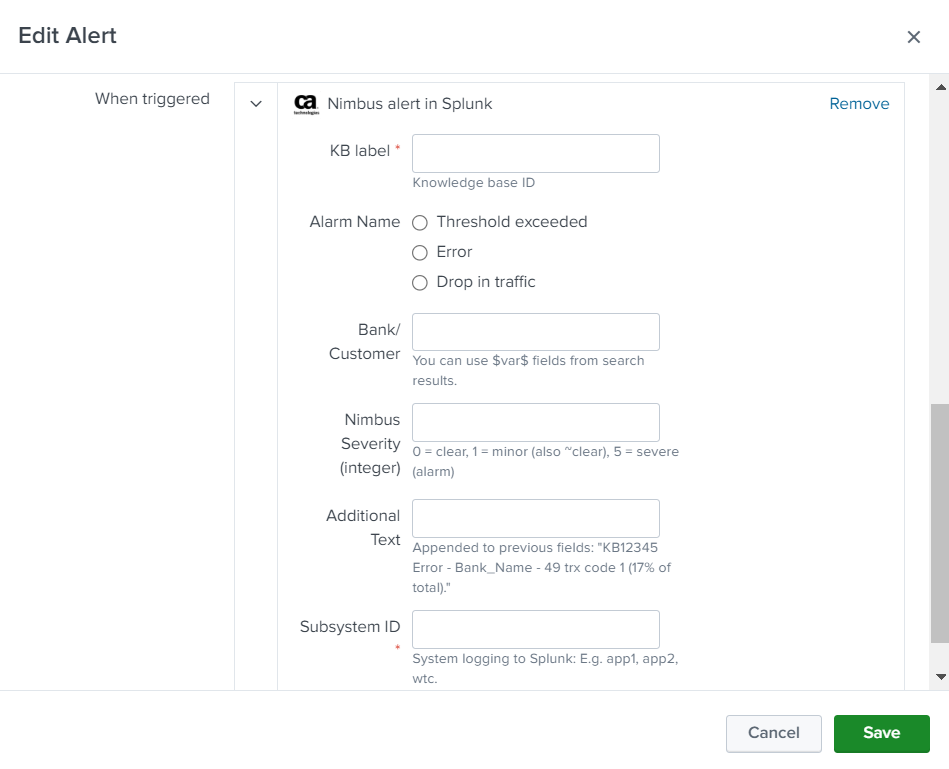
The custom add-on created for Splunk provides custom alert trigger functionality and is designed to send alerts to CA UIM using the 'nimalarm' utility. This add-on can be configured to monitor any type of data source within a Splunk environment, and when a specific event or condition occurs, it triggers an alert using 'nimalarm' to send it to the CA UIM system. The 'nimalarm' utility ensures that the alert is delivered in a timely and efficient manner, and can be customized to meet the specific needs of each user. With this add-on, users can proactively manage their data, detect and respond to issues quickly, and ensure that critical events are immediately communicated to the CA UIM system for further action. This can help users to improve their overall Splunk experience, and ensure that they are able to effectively manage their IT infrastructure. Install this add-on as per the Splunk documented guidelines. Usage: 1. Create a search and save it as an alert. 2. Select trigger condition: "Nimbus alert in Splunk" 3. Fill-in the required details and save it. Note: 1. Should have Nimbus agent installed in your system. 2. Ensure 'nimalert' is stored under /opt/nimbus/bin/nimalarm, if not, you can change the path in TA-nimbusalerting/bin/nimbus.sh. 3. Supports only Linux x86-64.

Categories

Created By

Yash Chawla

Type

addon

Downloads

184

Splunk Answers

Resources

Log in to report this app listing